Killing the "Lollipop": Rebuilding Rotation UX in React Konva
2025-12-14When I started building a canvas-heavy product with React Konva, I ran into a UX problem almost immediately.
Konva is powerful, stable, and well thought-out — but its interaction model is old. In particular, rotation is controlled by the classic lollipop handle: a small stick protruding from the bounding box.

That handle no longer exists in modern design tools.
In tools like Figma or Sketch, users have strong muscle memory:
- grab a corner to resize
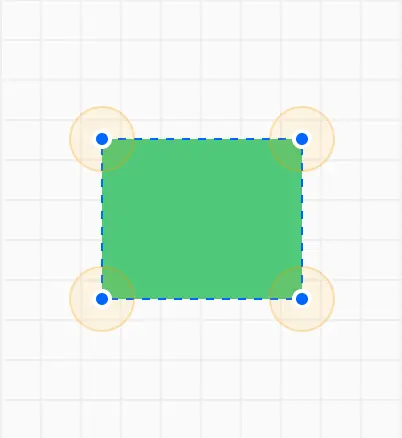
- hover just outside a corner to rotate
There’s no visible widget, no extra UI, and no explanation required. Rotation is discovered spatially, not visually.
I wanted that same interaction model in my canvas app. Instead of tweaking Konva.Transformer, I decided to remove it entirely and rebuild rotation from first principles.
This post walks through the architecture and geometry behind that decision — starting from the interaction idea, moving through the type system, and ending with the rotation math itself.
Why Not Customize Konva.Transformer?
At first glance, the transformer seems like the obvious place to start. But the real problem isn’t its visuals — it’s its encapsulation.
Konva.Transformer bundles together:
- hit testing
- cursor logic
- rotation math
- interaction state
inside Konva’s internal implementation. That makes small UX changes — like where rotation activates or how the cursor behaves — disproportionately hard.
What I wanted instead was:
- hit testing that lives in application code
- rotation math I can reason about
- cursor feedback that actually reflects what’s happening
So rather than fighting the transformer, I ejected interaction entirely out of it.
You can find the whole implementation and try it for yourself:

The Strategy: “Ejecting” Interaction to the Stage
The core idea is simple:
The stage owns all interaction. Shapes are dumb.
Instead of letting Konva manage rotation internally, we listen to onMouseDown, onMouseMove, and onMouseUp on the stage, track interaction state ourselves, and update shape state explicitly.
That immediately raises a question:
What exactly is the user doing right now?
To answer that cleanly, I model interaction as a discriminated union.
Defining Interaction as State
type TransformMode =
  | { type: "none" }
  | {
      type: "rotate";
      center: { x: number; y: number };
      corner: { x: number; y: number };
      base: number;
    }
  | { type: "drag" };
This type does a lot of work:
-
nonemeans no active interaction -
dragmeans pointer movement translates the shape -
rotatecarries everything rotation needs:- the rectangle’s center
- the corner that initiated rotation
- a
baseangle used for cursor orientation
A useRef<TransformMode> holds the current mode. It changes only on mouseDown and mouseUp.
mouseMove never decides what the interaction is — it only reacts to the current mode.
That separation is crucial.
Hit Testing as a Pure Function
With interaction state defined, the next problem is intent detection.
When the pointer is here — what would happen if the user clicked?
I encode that logic in a single function:
function checkHitArea(
  pointer: { x: number; y: number }
): TransformMode;
This function does no side effects. Given a pointer position, it returns the interaction mode that should activate if the user clicks right now.
It’s used in two places:
onMouseMove→ preview intent (cursor changes)onMouseDown→ commit intent (lock interaction state)
That symmetry keeps the mental model clean.
Resolving Drag vs Rotate
There’s a subtle UX edge case:
If the pointer is inside the rectangle but near a corner, users expect to drag, not rotate.
Modern design tools resolve this spatially. Rotation only activates outside the shape.
I replicate that logic by comparing distances to the rectangle’s center:
for (const corner of cornerList) {
  const distToCorner = pointsDistance(pointer, corner);

  const pointerToCenter = pointsDistance(pointer, center);
  const cornerToCenter = pointsDistance(corner, center);

  // Pointer must be farther from center than the corner itself
  if (cornerToCenter > pointerToCenter) continue;

  if (distToCorner <= ROTATE_HOTZONE) {
    return {
      type: "rotate",
      center,
      corner,
      base: corner.base + rectState.rotation,
    };
  }
}
If rotation doesn’t match, I fall back to a point-in-polygon test to detect dragging.
This mirrors how Figma resolves ambiguous intent — and it feels immediately familiar.
Rotation Is About the Center, Not the Corner
Once rotation starts, the math begins.
The key insight is this:
You cannot rotate a rectangle in place by changing
rotationalone.
Canvas rotation happens around the shape’s local origin (top-left by default). If you don’t adjust position, the rectangle will orbit instead of spinning.
To get a stable rotation, the rectangle’s center must remain fixed.
Step 1: Measure Angular Delta
We measure how much the pointer has moved around the center, relative to the original corner.
const angle = Math.atan2(pointer.y - center.y, pointer.x - center.x);
const angle2 = Math.atan2(corner.y - center.y, corner.x - center.x);
const delta = (angle - angle2) * (180 / Math.PI);
This delta is the rotation change since the interaction began.
Step 2: Rotate the Top-Left Around the Center
To keep the center fixed, we rotate the rectangle’s top-left point around the center.
Conceptually:
- Translate the rectangle so the center is at
(0, 0) - Rotate the top-left vector
- Translate back
const deltaRad = (delta * Math.PI) / 180;
const cos = Math.cos(deltaRad);
const sin = Math.sin(deltaRad);

const dx = initialRect.x - center.x;
const dy = initialRect.y - center.y;

const newX = center.x + (dx * cos - dy * sin);
const newY = center.y + (dx * sin + dy * cos);
This is the entire trick.
Rotation becomes a pure geometric transformation instead of a Konva side effect.
Step 3: Commit the New State
Finally, we apply both position and rotation together:
setRectState({
  x: newX,
  y: newY,
  width: initialRect.width,
  height: initialRect.height,
  rotation: initialRect.rotation + delta,
});
The rectangle now spins exactly in place — no drifting, no wobble, no surprises.
Cursor Feedback Is Part of the Interaction
Most rotation implementations stop once the math works.
But cursor feedback matters.
Each corner has an inherent orientation, and the rectangle itself may already be rotated. I combine both:
base: corner.base + rectState.rotation
That value feeds into a small hook, useRotationCursor, which:
- generates a tiny SVG arrow
- rotates it to the correct angle
- encodes it as a data URI
As the user rotates the shape, the cursor rotates with it.
This is a small detail — but it’s the difference between something that works and something that feels native.
What This Enables
This demo intentionally leaves out:
- resizing
- snapping
- multi-selection
- keyboard modifiers
But the architectural shift is already complete.
Hit testing, interaction state, geometry, and rendering are now orthogonal concerns. Adding resizing doesn’t require rewriting rotation. Snapping doesn’t interfere with dragging.
And most importantly:
The lollipop is gone.
What’s left is an interaction model that matches modern design tools — built on simple math, explicit state, and predictable behavior.